Does My Small Business Need a Website

Why does my business really need a website? My customers are all local I don’t see the value in a website. How can it possibly help me?

This is a common question that comes up time and time again for many small business owners who have only local customers. Instead of asking if you need a website ask yourself “Would my business benefit from exposure 24-hours 7 days a week, 365 days a year?” The answer should now be a little clearer. No other medium allows you to expose all the benefits of your small business to your target market at their convenience and provide a source of direct communications from them to you?

Any business that is currently in the yellow pages should also be online. And any business that isn’t currently in the yellow pages should consider going online first before the yellow pages. The internet is where your customers expect to find you. The internet is where your customers are.

Having a website allows your potential customers to gather the information they need from their own computer monitors. Are there questions your potential customers ask daily? Are there typical items that help sell your products or services, a list of features, or a bulleted list of services? This is the information that needs to be available 24/7 on your site.

Customers prefer to gather information anonymously. They simply like to gather information before they put themselves in a position where they’ll likely be asked to answer questions. The majority of your customers prefer to know what they’re coming to buy before they walk in your door and will appreciate an informative site that functions as an expert salesperson during all those hours you’re not open for business.

Think about how many times you have used a search engine within the past week to research a product or service that you were considering purchasing. The benefits of a website are innumerable.
Professionally Designed Websites Matter

Have you ever found yourself searching for something online and came across a site that just didn’t leave you with a good impression? You know the kind, hard navigate, not very visually pleasing, maybe be a bit shady looking. If you’ve ever found yourself in this situation did you stay on the site or leave only to continue your search?

More than likely you left and kept searching. A 2002 Stanford Guidelines for Web Credibility study shows that people quickly evaluate a site by visual design alone.

Having a website is a reflection on your company. If your site looks horrible this will reflect onto your products and/or services, in turn visitors will assume that your products and/or services are horrible.

As the old adage goes, “You may never get a second chance to make a good first impression.” This is even more important with your website. The impression made on your visitors will greatly determine whether or not that visitor becomes a customer. Having a professionally designed website might mean the difference between just another visitor and a qualified lead.

Any designer can design a website. Finding a designer that understands how to align your business goals with usability best practices and design theory is where the true talent comes in.

Having a professionally designed website really does matter and is well worth the investment.

A Gift, an E-commerce Site and Bad Navigation

A recent online experience got me thinking more about how e-commerce sites really should focus in on what a usable site consists of.

A quick story.

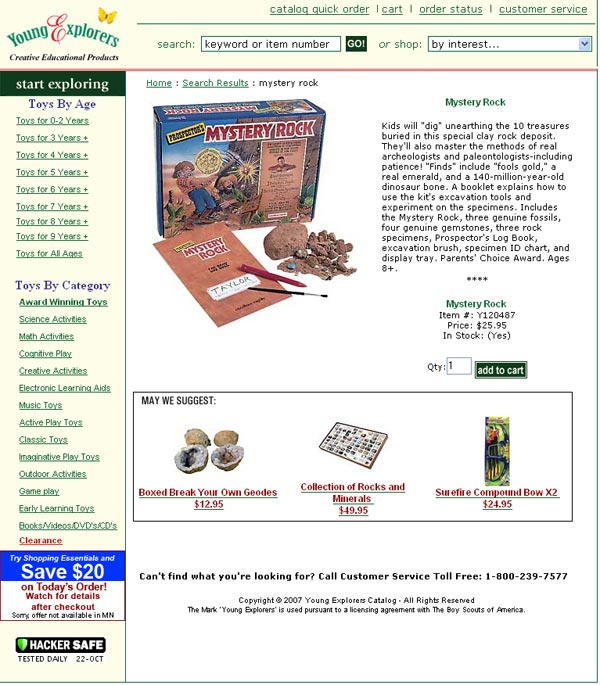
Our middle son is having a birthday in a couple of weeks and my wife went online to order a gift he wanted (The Mystery Rock – an archeologist’s excavation kit). She knew what he wanted since he marked the item in the catalog. She had a couple of questions about whether he really wants, and if he’ll enjoy it, etc. so called me to get my opinion.

Mystery Rock View larger image

I proceed to go to the website and try to find the gift in question. Here is where it falls apart.

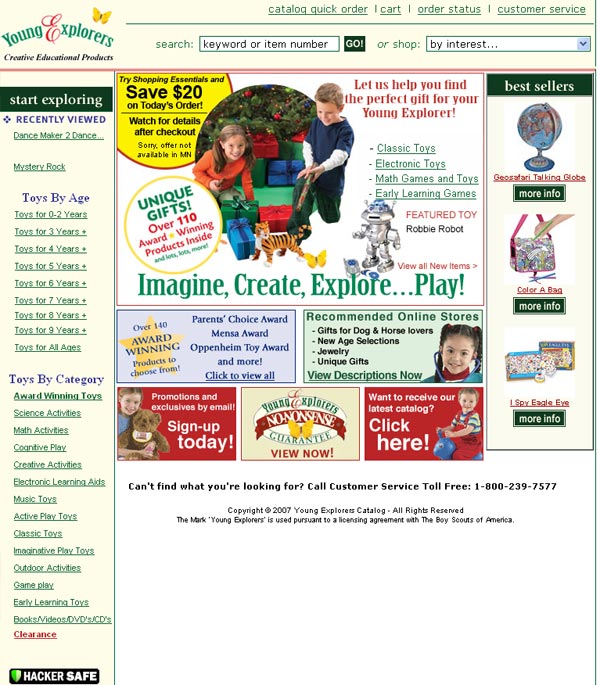
Upon arriving at the homepage I begin my hunt for a link that will take me to where I think I need to go. But in looking at the options I pause and begin to wonder where to go.

I’m presented with “Gifts by Age,” pretty straightforward but I skipped right over these, I had an idea what I was looking for. Instead, I went to “Toys by Category.”

Now, my mind begins running through the scenarios listed below:

  • Science Activities – archeology is science, but maybe this toy requires some more cognitive thought
  • Cognitive Play – hmm, pounding a rock, OK probably not here
  • Creative Activities – it definitely is a creative idea, but how much creativity is involved finding bones?
  • Outdoor Activities – I guess it could be messy, kids + dirt = mess

Image of the navigation that caused my confusionView larger image

Meanwhile, as I try to figure out what to click, my wife, who has already read me the entire description from the catalog is wondering what the heck I’m doing and wants an answer.

I decided to just search for the product number, which got me there quickly and I was able to answer my wife’s question (I believe she had already made the decision while I was having navigation woes).

Needless to say the navigation failed me. Had we not had the catalog the site may have failed me, in turn the site would have lost a sale.

As I’ve mentioned in another post e-commerce sites need to focus on usability.

Zappos Understands Experience Matters

I came across this postI Heart Zappos (via 37 Signals) that stood out as a company that gets user experience.

A customer ordered a few pairs of shoes for her mother from Zappos and for one reason or another needed to return them. Various issues cropped up, lost packaging slip, illness, out of town, caused the shoes to sit around an not be returned within the 15 day window. In the meantime, sadly, the customer’s mother passes away.

Zappos emailed the customer to inquire about the shoes since they had not yet been returned (customer service plus #1). The customer replied and informed Zappos that her mother has just died that the shoes would be sent back as soon as possible. Zappos then emailed back to say they have arranged for a UPS pick up of the shoes so the customer wouldn’t have to take the time to do it herself (customer service plus #2).

A few days later the customer receives a large bouquet of flowers with a card that read from Zappos (customer service plus #3).

Not only did Zappos ignore company policy by excepting the shoes after the return window expired, they made a personal connection with a customer. Zappos understands why experience matters.

Creating Usable Navigation

It is a sinking feeling when you have realize you were given wrong directions, made a wrong turn and are now lost. Now you are forced to turn around, backtrack and get yourself back on track. Add to the frustration the fact that this little “detour” has now made you over an hour late.

While not as traumatic as getting lost while driving, getting lost on a website is a daily occurrence for web users. When users feel lost on a website the navigation has failed.

Two (2) Critical Website Navigation Goals.

  • Provide your audience with a clear understanding of your website’s structure, its road map so to speak.
  • Enable your users to easily find the information they are seeking

Much like a map your website needs to provide an easy way for users to find their way around. Navigation tools need to be able clue the user into the way to navigate around a site and guide them to their destination.

Four (4) Keys to Usable Navigation

  • Start by making sure your navigation system is consistent across your site
  • Indicate to the user where they are so the user can establish a reference point
  • Show users where they can go
  • Let users know where they have been in case they have the need to retrace their steps

With an understanding of your website’s structure and a clear visible path to the content your users will have the confidence to continue moving towards their goal.

Know Why Your Customer Will Use Your Website

Understanding why a customer will come to your website is the first step to building a meaningful website.

In working with many clients over the years, I’ve seen the only initial goal of a website to create a “Wow” factor. This being an attempt to impress their customers and gain a competitive advantage. Unfortunately, this rarely works as planned. And often times leads to frustration from both the client and the designer each trying to seek the elusive “Wow.”

A better approach is to know why your customer is coming to your website in the first place. Example questions you should ask yourself:

  • What benefit can a website provide my customers?
  • Will customers have questions that could be answered online?
  • What are my customers’ needs?
  • Are customers looking for a way to contact me?
  • Are customers researching products or services before making a decision?
  • Will customers go online to compare my company against my competitors?
  • Will customers look online for samlpes of work?
  • Can my website extend the offline, in store, experience?

Understanding your customers is only one step to a great website. But if done correctly could be a website with the “Wow” factor.

Debunking the Myth of the Fold

The fold, an invisible line placed on a website where the bottom browser chrome cuts off the rest of your page, forcing the user to scroll to see the remainder of the content. Content of any importance must reside above the fold if it is to be seen let alone clicked on. Any content below the fold is well, just not important. This was the design convention that designers would design towards. Surprisingly some still do.

But the fold is no longer an issue, maybe it never really was. Research has shown that users will scroll to find the content they are looking for. And there can be a lot gained by allowing your site to scroll and adding white space making your site easier to read.

I found it interesting, and somewhat shocking when working on a project to hear the client talk about moving more information above the fold. They client was concerned that users were not clicking on the links below the fold and that to increase the click through rate on these links that the information must be placed above the fold.

The client was very visual in nature so sharing only numbers and percentages wasn’t going to cut it. I needed to debunk this myth of fold visually.

In preparation for the meeting I captured the homepage of five (5) different websites that visitors to my clients’ website would also visit. I then marked on each one where the “fold” would be and measured the number of pixels above and below the fold.

The images from my presentation are shown below along with the measurements are listed below.

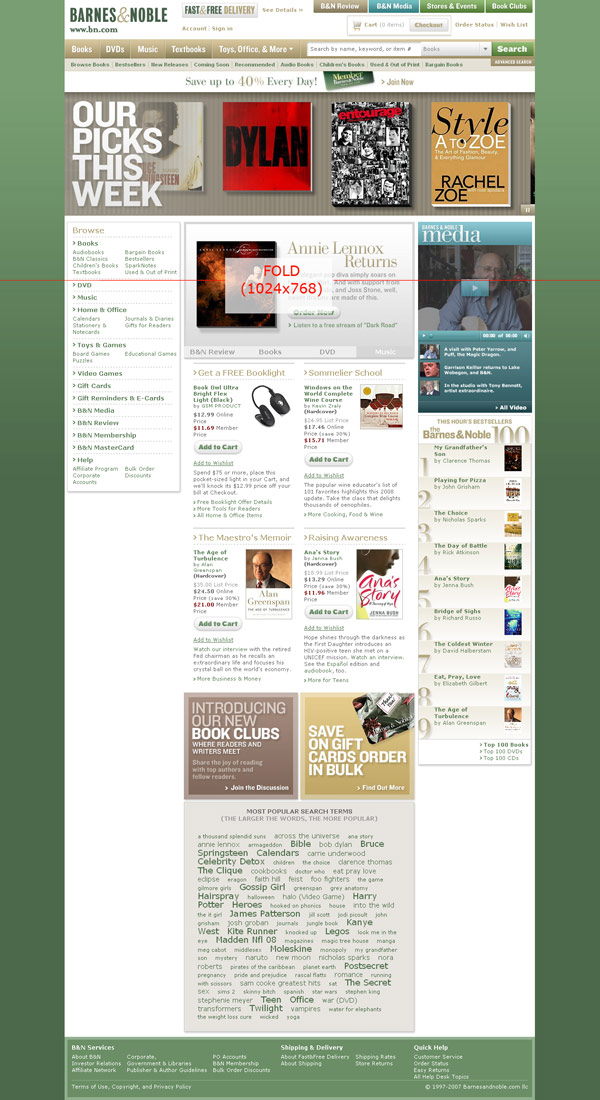
Barnes & Noble

  • 25% of site information above the fold
  • 75% of site information below the fold

Barnes and Noble Thumbnails
View larger image

Target

  • 27% of site information above the fold
  • 72% of site information below the fold

Target Thumbnail
View larger image

HGTV

  • 27% of site information above the fold
  • 72% of site information below the fold

HGTV Thumbnail
View larger image

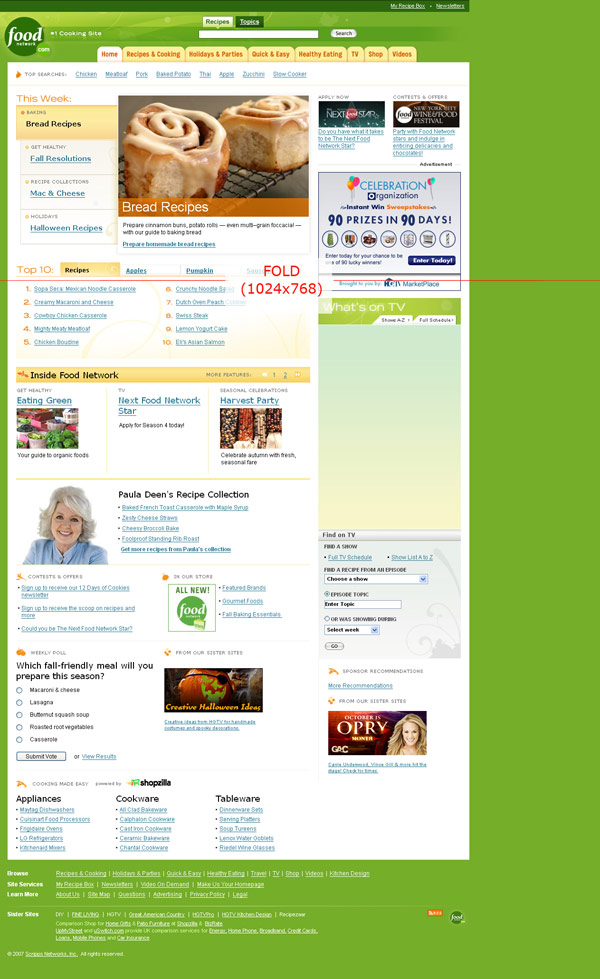
FoodTV

  • 28% of site information above the fold
  • 72% of site information below the fold

FoodTV Thumbnail
View larger image

This presentation proved to be a convincing argument and really opened the eyes of the client. The fact that major consumer brands are designing their websites so that over 70% of the content is below the fold should solidify the fact that the fold is a myth.

With all the all the variable that make website design difficult it is time to remove one troublesome myth and concentrate on the real stuff.