Ecommerce Sites Need to Focus on Usability

Have you ever walked into a store and within minutes you knew the experience would be one that leads to frustration? A store where the aisles were cluttered and hard to walk through, items on the shelves were messy and there seemed to be a general lack of organization. But you stick it out because you need to get this one specific item and the thought of driving to another store is even more frustrating.

Now, imagine this experience happened to a customer online. They arrive at a site that is cluttered, not organized and hard to find anything what are the chances they are going to stick it out? Probably not likely.

The time invested is seconds of that of an in store experience. The customer can just click over to the next site and hope for one that is easier to use, better display the content or just a better experience overall.

When dealing with only seconds to make an impression website usability is a critical factor.

“Today’s online shopper is extremely web-savvy and expects more than ever, forcing retailers to raise the stakes.”

“Companies are investing in new features that will keep customers coming back, and homepages everywhere are getting a major facelift.”
Scott Silverman, executive director of Shop.org

Forrester Research shows that consumers are more internet savvy than in the past and are more aware of all the choices afforded to them. Users are demanding a better user experience.

Ecommerce retailers are also becoming increasingly aware of this trend. The research shows that close to 90% of retailers are planning to improve their content pages, product detail pages and homepages.

The need to capture your customer within seconds is crucial in the success of your website. Seconds count. Look at your homepage with a critical eye making sure that it is simple to use and easy to understand. It may be you are one of the 90% of companies that needs to improve your ecommerce site.

Why Hire a Professional Web Designer

The reasons for hiring a professional web designer are the same reasons as hiring any other professional. You want someone who is knowledgeable in design, user experience and usability. The designer should be able to understand the needs of your clients and translate them to an online experience. As such a professional web designer will create a site that not only meets your needs but also the needs of your customers.

I’ll Just Get Joey From Down the Street

With the advancements in WYSIWYG editors, open source themes and the multiple books on websites, HTML is becoming a household word. Elementary schools have even started showing students how to develop their own web page. It is no wonder why so many people are calling themselves designers. So, Joey from down the street might be an HTML whiz. But what are the chances he knows how to properly create a user interface. Or how to leverage your site to enhance your current marketing and business goals. What about assisting you in determining your site’s purpose?

You Do Have a Purpose?
You have a site for a reason. Or if don’t you need to. Having a site for the mere fact that you have a site no longer is a legitimate reason. What purpose will your site serve? What benefit would your customer receive from visiting your website? Who are the users that will view your site? A professional designer can help you answer these questions as well as, establish goals and objectives.

Web professionals understand the fact that with so many choices of sites out there your site must stand out. It must also speak to your customers. Establishing a purpose will result in a better designed site. Leaving a lasting impression with your customers.

Even more so a web designer will help you establish a purpose for customers to come back to your website. Each time you get a customer to come back you will establish more mind share than the time previous. And so on.

Study Your Competitors

So now that a purpose has been established it is time to create the look and feel. One of the best ways to get started is take a look at your competitor’s sites. Make a list of things that you like about the site, feel work well, or things that you feel don’t work well. Your web designer should also research your companies’ competition. Challenge the designer to make your site better then what is out there already. Be it a more professional look, better usability or more functionality. Whatever the case maybe you want your designer to make your website better than that of your competition.

The Big Issue

As with anything cost is a driving factor in most company decisions. It will come as no surprise that Joey from down the street will create a site cheaper than a trained professional. But what will the end result be? How well will the site reflect your company?

Customers are quick to judge the book by the cover, so to say. If your website isn’t up to par chances are good that your potential customers will leave before they go any further than the home page. If they get frustrated or discouraged by your website, it won’t leave a very good message about your company. This result could end up costing way more than the cost of a professionally designed website.

Not Intentionally Bad

No one intentionally designs a bad website. And I’m sure that a Joey from down the street somewhere has designed a gorgeous, functional and well-structured site. Chances are however, that you will get a better ROI if you go with a professional designer.

Form Design Basics: Error Handling

Form design is tricky. Sometimes designers don’t understand all the complexities of a given form and misjudge the time needed to properly design them. Your web site’s form is essentially the heart of any transaction. It is of the utmost importance to design the form correctly.

A frequent question on form design is how to handle error messages?

My typical response is to build the form to do the “heavy lifting” so that the majority of errors can be eliminated.

Create the form to handle varied inputs. For example don’t force a user to figure out how you want a phone number. If they enter with dashes (periods or parenthesis) don’t fire an error message and force the user to correct the problem simply strip out the extraneous characters on the backend and move on.

Clearly indicate what is required, best practice is to use an *

Since no matter how well the form is built there is going to be errors make sure the errors are clearly indicated as well as instructions on how to correct the problem. For long forms it is a good idea to indicate the errors at the top of the page and also by the field. This eliminates the need for users to scroll up down trying to find the errors. The standard for error messages is red. I’ve used a combination in the past of a yellow alert box with red text. This really stands out against a white background.

In some instances I’ve seen live validation work well for, instance when passwords don’t match, or password strength indicators. Other times it can become rather intrusive. Whereby it fires an error before I’ve even finished typing my response.

If the form is of the complex nature (i.e. mortgage applications, claim reporting, etc.) contextual help along side of the forms can prove to be a good idea. A good example of this can be seen at Wufoo

These points only scratch the surface on error messages and form design however should get you pointed in the right direction. It is important to think through your form making it as easy as possible for your users to complete.

Click Here…and Then What

There has always been a debate around whether or not one should use the words ‘click here’ as link text. On the one hand, we know usability experts strongly advise against this since the link is not descriptive enough.

While on the other hand some copywriters have exactly the opposite opinion and showing ‘click here’ is perfectly acceptable. The counter argument is that you will get better results if you tell the person exactly what you what them to do. Now if we throw in the fact that SEO gurus prefer links that contain keywords optimized for the page we have a real situation on our hands

So who’s right? The answer is all of them.

From a usability perspective it is true that the link should be descriptive and understandable to the user. It is also true from a marketing a copyrighting standpoint that telling the user what you want them to do produces better results. And we know that providing keywords in the links help with search engine optimization.

With all of these statements being true what would happen if you combined both the action word with the content related words to form a link such as:

Click Now to Subscribe to Our Design Blog

A link shown in this way solicits the action the user should take, Click Now, Subscribe tells them what the purpose of the link is for, clearly indicating the goal of the link and Design Blog is the optimized phrase.

The length of the link falls within the 7-12 word range, desirable when try to produce good information scent. Personally however, I think the link could be shortened and still be affective.

Subscribe to Our Design Blog

The action we want the user to take is to subscribe, the click here seems to be redundant since that is the typical action one does with a link. However, I can see how it provides a stronger call to action.

The lesson in all of this is to make sure the your links are understandable to your users. Whether you use ‘Click Here’ or something different if the users aren’t clicking then chances are they aren’t finding what they are looking for.

What is User Experience

Wikipedia defines User Experience as: a term used to describe the overall experience and satisfaction a user has when using a product or system. It most commonly refers to a combination of software and business topics, such as selling over the web, but it applies to any result of interaction design. Interactive voice response systems, for instance, are a frequently mentioned design that can lead to a poor user experience.

Nathan.com defines users experience as : The overall experience, in general or specifics, a user, customer, or audience member has with a product, service, or event. In the Usability field, this experience is usually defined in terms of ease-of-use. However, the experience encompasses more than merely function and flow, but the understanding compiled through all of the senses.

So what exactly is User Experience?
At the highest level it is the feeling a user has before, during and after using your site (or web application).

User experience mixes principles like usability, visual design, business objectives, information architecture and navigational design (to name a few) all together to produce a set result. If done correctly this result will be a website with a good user experience. Different types of websites produce different types of experiences however the fundamental principals are the same. You might compare user experience to baking a cake. The cake flavor may be different yet the core ingredients are the same.

Also, much like a cake where no one ingredient can stand alone neither can one experience principle. It is the collective whole that forms the basis of the experience.

Creating an experience that meets the need of your customers as well as your business is challenging. However, when done correctly the benefits of user experience is a big competitive advantage.

Do You Have Frumpy Website

In the day of reality TV, makeover shows seem to be everywhere. You know the ones where the show take someone who may not put a whole lot of effort in their appearance, rather frumpy, and by the end of the show turn reveal a brand new person with a whole new confidence. Reality TV at its finest, right? Well the shows may not be for everyone but it did get me thinking about graphic makeovers.

One of the key principles of these shows is to strip (sometimes literally) down to the basics. Sort of a fresh start. The hosts learn what the person is about, features that make them who they are and then build from that. They understand what makes the person unique and work within the foundation they have developed. The shows don’t just apply some makeup, and buy some new clothes they makeover the person, the entire person.
Thumbnail image of Website Before Redesign
Ask yourself “Is my website frumpy?”

If it is look at getting back to basics. Understand what your business strategy is and how it can be communicated online? What information can you provide about the products or services you offer? Are people finding the information on my site? Are customers even finding my website?
Thumbnail image of Website After RedesignWebsite After
Be critical when looking at your site. Does it care about its appearance, looking professional or does it look sloppy, like it just threw on some sweatpants and headed out the door? Your website is often the first interaction your business has with potential customers. A professionally designed website is a critical part of that impression.

Does your website have clearly communicated message? Is it clear how customers place an order, request information or how to sign up for your companies newsletter? You need to determine what makes a visit to your website a success for both new and existing customers.

When looking to redesign a frumpy website take a bit of advice from reality TV makeover shows and get back to basics. Once the basics are defined then pour on the pretty. Designing a website that works and looks good can do a tremendous amount for the confidence of a business.

View our most recent designs in the Before and After Portfolio

The US Apeals Court Rules It’s OK to Bury Your Terms & Conditions

A U.S. Appeals Court has ruled that a website can incorporate terms and conditions language into the clicking of a continue button. Meaning a website no longer needs to require a person clicking a checkbox to agree to the terms and conditions of the site.

The dating website True.com was sued by a male user who said he was unaware that the website’s free membership was only for women. A main part of the case was the fact the user argued he had not agreed to terms and conditions on the website’s registration form when signing up for a free trial.

Now, I’m not sure about you but I have never completely read anyones’ terms and conditions however I still think this is a poor decision by the court and one that I would urge you not to listen to.

It seems a little shady to try and bury your terms and conditions – and causes one to question if you have something you are trying to hide. If you have terms and conditions that will affect how a person will interact with your site provide a checkbox that must be acknowledge before they continue. Even if the person doesn’t read the terms they will be forced to at least acknowledge there are terms to the service.

Terms, conditions and all that legal mumbo jumbo may not be fun to read but think about how poor of an experience it will be if the user is blind-sided by something they “should have” read but didn’t because it was “hidden”

Updated Website

So it’s finally complete, well complete for now. Small Farm Design has been updated with the largest addition to this site being the new design and experience blog. My goal is to provide information for small businesses that will help them when selecting a designer, figuring out if a website redesign is necessary, or to provide assistance in creating the best user experience.

I hope you find something useful while you are here. If you don’t please feel free to ask questions or request something specific and I’ll do my best to fulfill the request.

Welcome to the Farm.

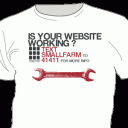
The T-Shirt That Texts Back

Text SmallFarm to 41411

It’s always interesting to see creative thinking people bridge online and offline experiences.

For example I have created a t-shirt that has a question printed on the front along with a number that you can text message to. Which after doing so the person will receive an answer. In this case the user is prompted to go back online to Small Farm Design — making a complete bridge experience from shirt to phone to website